Navigating the package returns process with ease
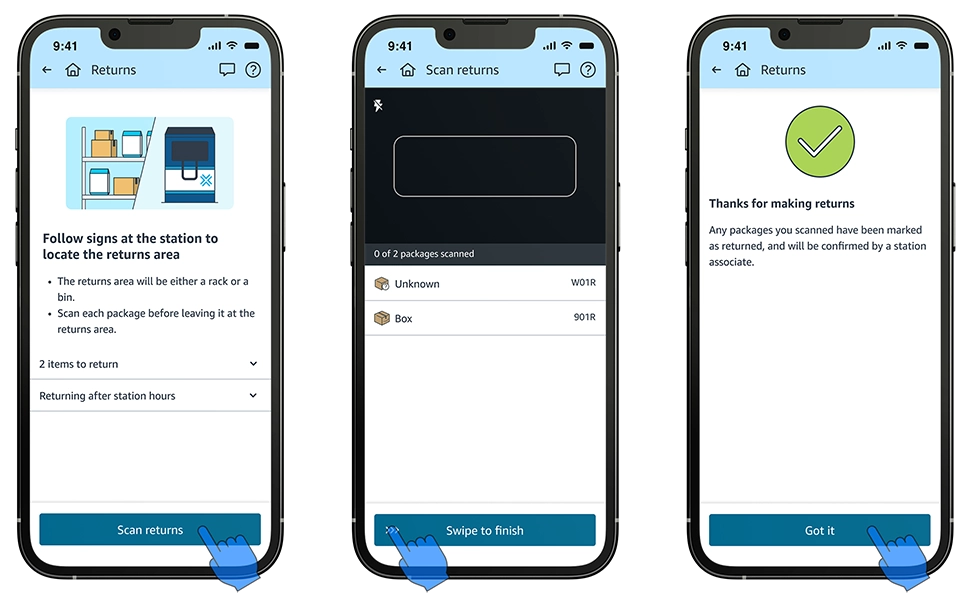
To help Amazon Flex delivery partners handle package returns efficiently and ensure undelivered packages get back to the station on time, the Amazon Flex app provides several useful features. These features guide you through the return process step-by-step, including confirming when you will return the undelivered package, as well as how to scan returned packages at the delivery station. Here are some of the key features that can help you complete your package returns quickly.
Delivering to a customer location
When you arrive at the customer location and are unable to deliver a package, double-check the delivery address in the Amazon Flex app to confirm you are at the correct destination. Do your best to follow reasonable customer instructions listed in the customer notes and contact the customer if you need help accessing a delivery location. You can use the Help menu in the upper right-hand corner of the app to call the Amazon customer, or Driver Support. If you are unable to find a safe location for the packages and cannot contact a customer, navigate to the help menu in the app by clicking the question mark icon (?) and selecting “Unable to deliver”. Then, make sure to select the accurate reason for why you were unable to complete the delivery.
Scheduling a package return
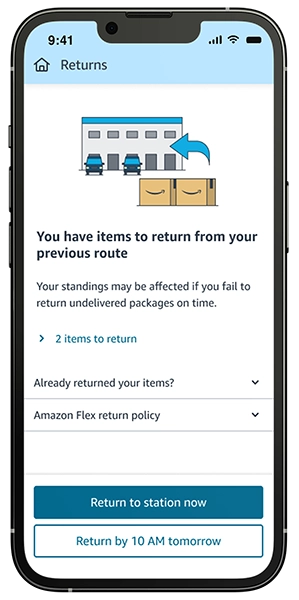
At the end of your route, the app will notify you of any packages that need to be returned and provide two convenient options: "Return to station now" or "Return by 10 AM tomorrow." If you choose to return immediately, the app will automatically provide you with navigation back to the pick-up location. If you select to return the next day, a reminder will be automatically created in your itinerary to help you remember to complete the return the following morning. All returns must be scanned using the Amazon Flex app by 10 AM.
To help Amazon Flex delivery partners handle package returns efficiently and ensure undelivered packages get back to the station on time, the Amazon Flex app provides several useful features. These features guide you through the return process step-by-step, including confirming when you will return the undelivered package, as well as how to scan returned packages at the delivery station. Here are some of the key features that can help you complete your package returns quickly.
Delivering to a customer location
When you arrive at the customer location and are unable to deliver a package, double-check the delivery address in the Amazon Flex app to confirm you are at the correct destination. Do your best to follow reasonable customer instructions listed in the customer notes and contact the customer if you need help accessing a delivery location. You can use the Help menu in the upper right-hand corner of the app to call the Amazon customer, or Driver Support. If you are unable to find a safe location for the packages and cannot contact a customer, navigate to the help menu in the app by clicking the question mark icon (?) and selecting “Unable to deliver”. Then, make sure to select the accurate reason for why you were unable to complete the delivery.
Scheduling a package return
At the end of your route, the app will notify you of any packages that need to be returned and provide two convenient options: "Return to station now" or "Return by 10 AM tomorrow." If you choose to return immediately, the app will automatically provide you with navigation back to the pick-up location. If you select to return the next day, a reminder will be automatically created in your itinerary to help you remember to complete the return the following morning. All returns must be scanned using the Amazon Flex app by 10 AM.
Real-time support options
If you need help during the returns process, you can contact Driver Support using the Amazon Flex app. We have a dedicated team who can provide guidance to you on completing your return successfully. For more information on the returns process and other delivery features, visit the "Making deliveries" section in the Learning Portal in the Amazon Flex app.
Related Blog Posts

Meet a delivery partner who stays active and pursues his passions with Amazon Flex
Location-based information and support at your fingertips
Navigating the package drop-off process with ease

Delivery partner recommendations for making successful deliveries
Your guide to Amazon Flex earnings
With Amazon Flex, you choose when and how you earn
Download the Amazon Flex app
Create an account to set your schedule, see your earnings upfront, and start delivering with confidence.