Navigating the package drop-off process with ease

To help Amazon Flex delivery partners navigate the package drop-off process with ease and ensure you can get deliveries to customers, we provide several useful features in the Amazon Flex app. These features enable you to have the information needed to make the delivery, to contact Amazon customers, and to get live assistance from our dedicated Driver Support team if required. Here are some of the key features that can help you save time and make successful deliveries at each location.
Delivery Notes
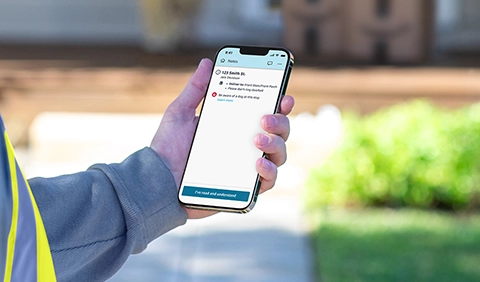
Once you are at a delivery location, review any notes about the delivery that have been left by the customer or Amazon. This may include details like where to park, location access codes, or a safe place to leave the package. This information is especially useful for apartment complexes and gated communities that may require special instructions. Delivery Notes are available at the bottom of the screen for each delivery location, and you can expand them with a tap.
Contact customer
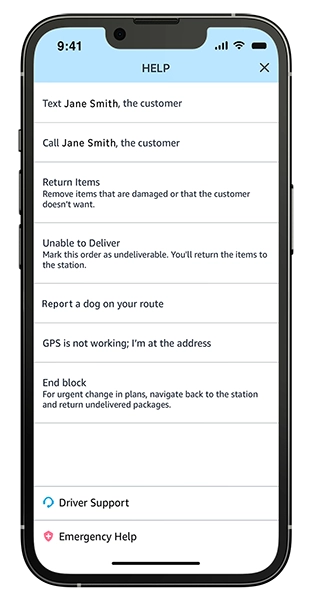
If you’ve read the Delivery Notes and need more information to deliver the package, or you arrive at a business that appears to be closed, reach out to the customer through the “Contact customer” feature. You can also contact the customer to ask them to put their dog away or to turn on a light to help you perform a safer delivery. Once you select the text or call option, you will be connected to the customer in a way that keeps your phone number private. You can choose what to text the customer through the custom option so you can quickly make requests and get the information you need to successfully make the delivery. This feature is available through the question mark icon (?).
Driver Support
Driver Support is another helpful resource, which provides live assistance through your choice of a phone call or in-app chat. The Driver Support team can attempt to contact a customer on your behalf if you’re unable to reach them and advise you on how to proceed.
For more information on each feature, visit the “Making Deliveries” section in the Learning Portal in the Amazon Flex app.
Related Blog Posts

Delivery partner recommendations for making successful deliveries
Your guide to Amazon Flex earnings
With Amazon Flex, you choose when and how you earn

Summer of Big Smiles is here
Staying safe while delivering in the dark
Staying safe when delivering around dogs
Download the Amazon Flex app
Create an account to set your schedule, see your earnings upfront, and start delivering with confidence.